Blog
Why page speed matters for a local business
October 21, 2026 · 5 min · Neil Black
- page speed
- Core Web Vitals
- local business
A person looking for a local business is usually already on a phone. They searched for a plumber, a dentist, a cafe, or a shop, and your page is what opened. They need a few ordinary things: what you do, where you are, when you are open, and a way to call, book, or write. Page speed is whether those things show up, stay still, and answer a tap.
Google publishes a small set of measurements for this, called Core Web Vitals. The Web Vitals overview on web.dev (opens in a new tab) is the reference, and Google Search Central (opens in a new tab) explains how the same measurements relate to Search. You need the three numbers, and a free way to see them.
What the three numbers are actually timing
Largest Contentful Paint, or LCP, is the loading number. It times the largest image, text block, or video in the visible part of the page. On a local site that is often the headline or a photo of the work. The Largest Contentful Paint guide (opens in a new tab) says a good LCP is 2.5 seconds or less, judged at the 75th percentile of real loads, on phones and on desktops separately. That percentile describes a slower but still common visit, not your best run on office Wi-Fi. A huge photograph, a video that downloads before the words, or text waiting on a font leaves the phone number in the page and still invisible.
Interaction to Next Paint, or INP, is the response number. Someone taps Call, opens the menu, or sends a form, and INP is how long the page takes to show that it noticed. The Interaction to Next Paint guide (opens in a new tab) says good values are 200 milliseconds or less, and poor values are greater than 500 milliseconds. A page can look finished and still hesitate on that tap.
Lighthouse loads the page with nobody typing, so it cannot measure INP. The Web Vitals overview says Total Blocking Time is the lab stand-in. When PageSpeed Insights has real-user data, that field number is the one that describes the tap.
Cumulative Layout Shift, or CLS, measures how much the page jumps after it appears. The Cumulative Layout Shift guide (opens in a new tab) says a good score is 0.1 or less, and a poor score is greater than 0.25. A late banner, an image with no reserved space, or a font swap pushes the address down as someone reaches for it. The tap hits something else.
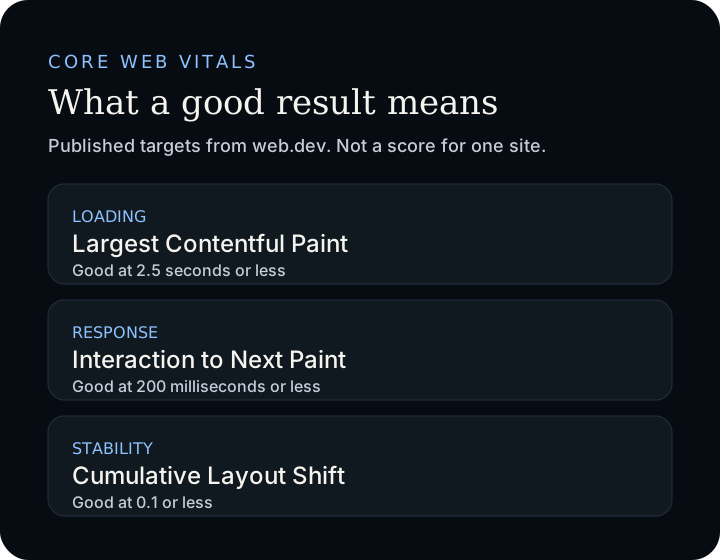
The figure repeats those published thresholds. It is not a score for your site.
What this does, and does not, do for Search
Speed is often sold as a ranking trick. Google's own pages are more careful.
The Core Web Vitals page on Google Search Central (opens in a new tab) recommends a good result for Search and for the person on the page. The page experience guide (opens in a new tab) says there is no single page-experience signal. Core Web Vitals are used by the ranking systems. Search still tries to show the most relevant result even when the experience is poor, and a healthy report does not guarantee the top spot. That guide also says chasing a perfect score only for SEO may not be the best use of your time. When many pages are genuinely helpful, a better experience can still contribute.
Speed also changes the visit you already earned. If the offer, the hours, and the phone number are late or shifting, people go back to the list and call someone else. Watch one person try the page on a phone, then measure it.
How to check a page with PageSpeed Insights
The free tool is PageSpeed Insights (opens in a new tab). The write-up of how it works is About PageSpeed Insights (opens in a new tab).
- Paste the full URL of a real page. Run the homepage, then the page you want someone to act on. A fast homepage does not mean the form is fine.
- Read the mobile result before the desktop result. PageSpeed Insights reports both, and a local customer is often on a phone.
- Keep field data and lab data apart. They answer different questions.
Field data comes from the Chrome User Experience Report: anonymized Chrome users over the previous 28 days. With enough visits, the tool shows LCP, INP, and CLS at the 75th percentile, colored good, needs improvement, or poor. These are the published buckets:
LCP   good at 2.5 seconds or less,     poor over 4 seconds
INP   good at 200 milliseconds or less, poor over 500 milliseconds
CLS   good at 0.1 or less,              poor over 0.25
The middle band is what the tool calls needs improvement. Those lines are published cutoffs, not a score for a business you have not measured.
Field data is often missing on a small site. A new page or a quiet week may not have enough Chrome visits, so the tool tries the whole domain, and if that is too thin it shows no real-user data. The lab section is still there. Lab data is a Lighthouse run in a controlled setting: useful for finding what to fix, and not a substitute for real visits. The documentation calls 90 or above good, 50 to 89 needs improvement, and below 50 poor. A good lab score does not promise good real visits, and the number can move between runs when you changed nothing. Read the audits for oversized images, files that delay the first paint, and elements that shift. The mobile run uses a simulated mid-tier phone on a mobile network, which is closer to a customer than the laptop you edit on.
Google Search Console has a Core Web Vitals report for sites that are verified there. PageSpeed Insights inspects one URL. Search Console groups URLs once real visits exist.
What to change after you look
Start with the metric that fails, and with the thing a customer needs on that page.
If LCP is slow, the report names the largest element. A hero image wider than the phone, a background video, or a headline waiting on a font are the usual causes. Size the photo for the screen, and let the words paint without decoration in the way.
If the page jumps, give images and embeds a width and a height so they do not shove the address down when they arrive. If taps feel late, question the extra scripts: a pile of tags, a chat widget, an embed nobody asked for.
Run the same URL again and compare the same mobile metric. You do not need a perfect 100. Can someone on a phone see the offer, trust the page to stay put, and finish the call, the form, or the directions?
Where to read it from Google
The public pages behind this note:
- Web Vitals (opens in a new tab), Largest Contentful Paint (opens in a new tab), Interaction to Next Paint (opens in a new tab), and Cumulative Layout Shift (opens in a new tab) on web.dev.
- Core Web Vitals and Google Search (opens in a new tab) and page experience (opens in a new tab) on Google Search Central.
- About PageSpeed Insights (opens in a new tab), and the tool at pagespeed.web.dev (opens in a new tab).
To talk through a report you already ran, write to the studio and bring the link.